Specify Calculations Criteria
- In the Estimate Profile, click the Calculations tab.
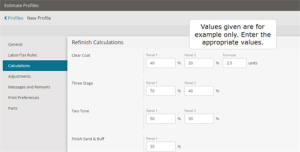
- In the Refinish Calculations section, review the default percentages for the refinish items and edit them if necessary.
The refinish adjustment you set in the Estimate Profile, can be applied when you modify any refinish lines in the estimate. The refinish adjustment reduces or increases the refinish time provided by the Collision Estimating Guide (CEG).

Set a maximum clear coat threshold
The set threshold value will be used when the total clear coat is calculated for all repair lines. Mitchell Cloud Estimating will not allow the clear coat value to be higher than the threshold value set in the estimate profile. On the estimate page, preview, and printout, an asterisk (*) will mark the clear coat line along with an explanation to indicate that a preset threshold has been enforced for clear coat.
- In the estimate profile, click the Calculations tab.
- In the Clear Coat section, enter the Estimate Max. You can enter any positive value between 0.0 - 99.9.
- Click Apply Changes.
- In the estimate editor add the repair lines. The system consolidates the entire clear coat labor units into a single line taking into consideration the overlap rules. The clear coat value will be calculated as usual until the estimate max value is reached.
When the maximum value is reached, The asterisk (*) sign is automatically displayed next to the units value in the clear coat line to indicate the system updated the value to the maximum allowed.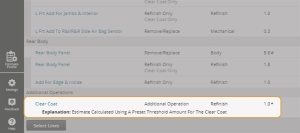

- In the Paint/Material Calculation Rates section, type the dollar amounts for paint and shop materials.
- In the Included Options section, select the applicable options:
- Include Non-Repair Lines in Shop Materials Calculation. Note: Refinish Lines Not included. – Includes all repair lines (except refinish repair lines) in the shop materials calculation. Clear this check box to limit the shop materials calculation to CEG repair lines and repair lines with a repair labor operation.
- Include an Explanation Line When Paint Limit Has Been Exceeded – Works with the Paint Limit option for calculating paint materials costs. When you select this check box, a generic message prints on your estimate repair lines when the paint materials exceed the limit.
- When you are finished making changes, click Save.