
How to
 Access the File Locations preferences tab
- On the System Info menu
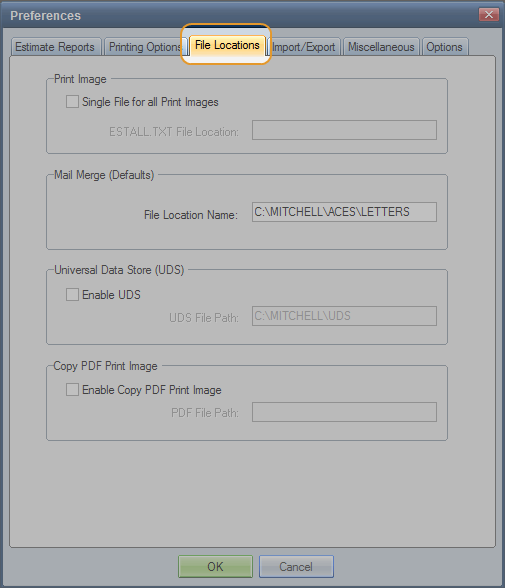
- On the Preferences dialog box, click the File Locations tab.

Reference
Window Components – File Locations preferences tabPrint Image | |
Single File for all Print Images | Works with the Reprint function on the Reports menu. When selected, the ESTALL.TXT file containing all estimates selected for reprint is created in the specified path. The file is overwritten every time you reprint a report. |
ESTALL.txt File Location | The location where the ESTALL.txt file is saved. The default file location is X:\MITCHELL\ ACES. Note: If the file location path contains a trailing backslash (\), the file isn't created. |
Mail Merge (Defaults) | |
File Location Name | The location where the Mail Merge file (MERGE.doc) is saved. The default file location is X:\MITCHELL\ACES\LETTERS. |
Universal Data Store (UDS) | |
Enable UDS | Select this check box to create estimate files in UDS format whenever a calculated or committed estimate is saved. The check box is not selected by default. To re-create an estimate as a UDS file, open the estimate, and on the File menu, click Save UDS. |
UDS File Path | The location where the UDS file is saved. The file name is based on the last eight characters of the estimate name. The default path is X:\MITCHELL\UDS. |
Copy PDF Print Image | |
Enable Copy PDF Print Image | Select this check box to create a duplicate .pdf print image. The check box is not selected by default. The Report Options must be set to generate .pdf image files. Note: A duplicate .pdf image is not created when Mitchell Estimating is used through eClaim Manager. |
PDF File Path | The location where the duplicate .pdf print image is saved. The default path is X:\MITCHELL\ACES\IMAGECOPY. |
See also: |
