
Use the Export option to enter settings for export file location, storage, and management.
How to
 Access export preferences
- On the System Info menu
-
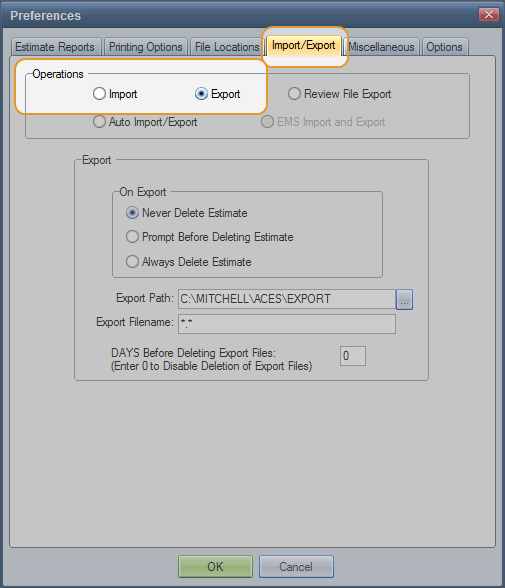
On the Preferences dialog box, click the Import/Export tab.

- Under Operations, click the Export option.
 Set export preferences
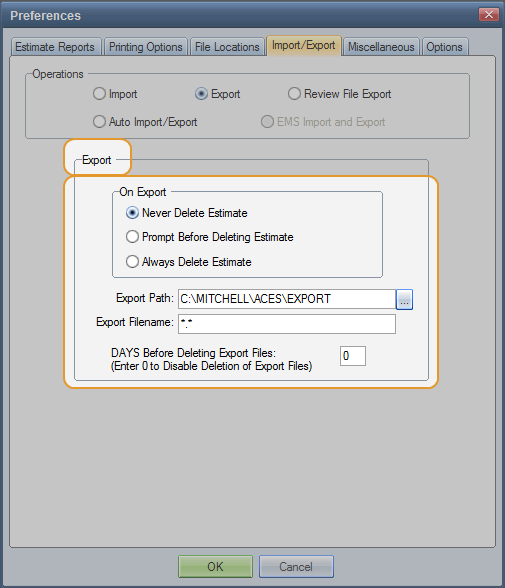
- Under Export, select your On Export preference: Never Delete, Prompt Before Delete, or Always Delete. (See Window Components for definitions.)

- Enter the Export Path. The default is C:\MITCHELL\ACES\EXPORT.
- Enter the Export Filename.
- Enter the number of DAYS to hold files before they are deleted. Enter zero to keep files indefinitely.
Reference
Window Components – Export preferences
|
On Export |
|
|
Never Delete Estimate |
Select this option to keep exported files. |
|
Prompt Before Deleting |
Select this option to receive a prompt before files are deleted. |
|
Always Delete Estimate |
Select this option to delete files after they are exported. |
|
Export Path |
Identify the directory where you want to export the files. The default is C:\MITCHELL\ACES\EXPORT. You can override the directory name when you export the files. |
|
Export Filename |
Sets the default file name for an exported file. The file name is saved in the Mitchell.ini file. The default is *.*. |
|
DAYS Before Deleting Export Files (Enter 0 to Disable Deletion of Export Files) |
Enter the number of days you want to keep export files before they are automatically deleted. The default is 0 (zero) to keep file indefinitely. Note: The system deletes files when you start your computer. |
|
See also: |
