
Vehicle Inspection
Use the Overall tab on the Vehicle Inspection dialog box to enter information about the overall condition of the vehicle.
How to
 Enter the overall inspection information
-
On the Estimate menu, click Vehicle Inspection.
-
On the Vehicle Inspection dialog box, click the Overall tab.

- Click the option that most accurately describes the condition of the vehicle.
- If the vehicle had prior damage, do the following:
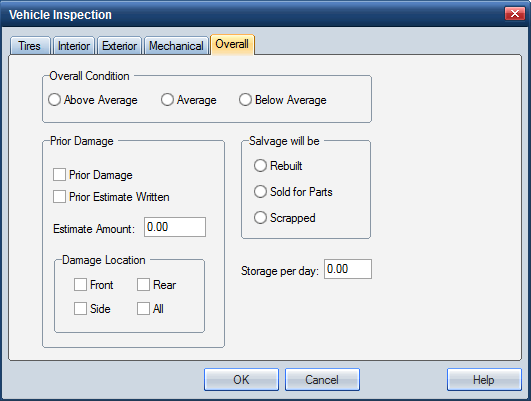
- Select the Prior Damage check box.
- If the prior damage was estimated, select the Prior Estimate Written check box, and enter the dollar value for the prior damage Estimate Amount.
- Select the check boxes for the prior Damage Location.
- In the Salvage will be section, enter the salvage status of the vehicle.
- If the vehicle is being stored, enter the daily storage fees in Storage per day.
- Click OK to save the information and return to the .
|
See also: |
