
Use the Valuation profile tab to define the source for vehicle's ACV (actual cash value) amount. The ACV amount displays while the estimate is being written.
You can also set an ACV Threshold percentage. The system displays a prompt when the estimate's total reaches this percentage of the ACV Amount.
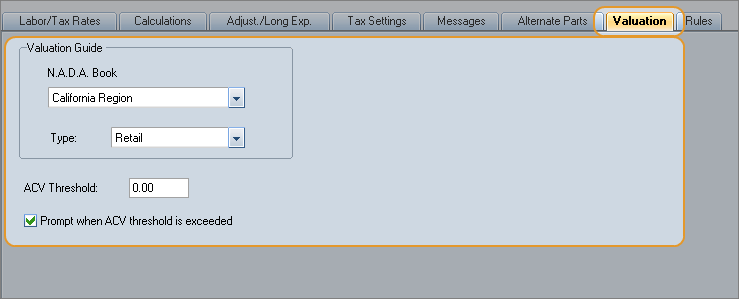
Reference
 Window Components — Valuation profile tab
|
The source for vehicle base values. The default displays but can be modified for each profile.
|
|
|
Type |
Select the type of valuation:
|
|
Note: The NADA Book and valuation Type print on reports. Additionally, these fields become read-only and cannot be changed once a valid vehicle is selected. For previously existing estimates, these fields default to Red Book Region B and Retail, respectively, and cannot be changed. |
|
|
ACV Threshold |
Use this setting to be notified when the total repair cost is nearing the vehicle's ACV amount. Enter a percent value above which the ACV % is flagged on the status bar. When the estimate total exceeds the threshold, the ACV % in the status bar is outlined in red. |
|
Prompt when ACV threshold is exceeded |
Select this check box to be prompted about Loss Designation when the estimate total exceeds or falls below the ACV Threshold. When the total of a partial loss estimate exceeds the ACV threshold value, you are prompted to change the Loss Designation to Total Loss. Clicking Yes at the prompt automatically changes the
Loss Designation field Clicking No at the prompt leaves the Loss Designation unchanged. You are prompted again when the estimate or its supplements are committed, or when the estimate is closed and reopened. Partial Loss Prompt When the total of a total loss estimate falls below the ACV threshold value, you are prompted to change the Loss Designation to Partial Loss. Clicking Yes at the prompt automatically changes the
Loss Designation field Clicking No at the prompt leaves the Loss Designation unchanged. You are prompted again when the estimate or its supplements are committed, or when the estimate is closed and reopened. |
|
See also: |
