
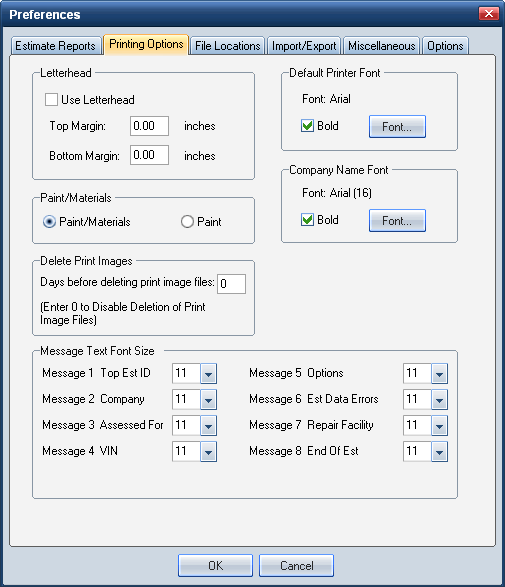
Use the Printing Options preferences tab to define the default print preferences for your reports.
You can modify these settings when you print or preview a report. Be sure to select the Display Estimate Report Options Dialog check box on the Estimate Report Preferences tab.How to
 Access Printing Options preferences
- On the System Info menu
On the Preferences dialog box, click the Printing Options tab.

 Print your default company name on supplements
- On the System Info menu, click Company Data.
- On the Company dialog box, select or enter the Name of your shop.
- Enter any other information as needed, and then click OK.
- On the System Info menu, click Preferences.
On the Printing Options tab, click the Use My Default Company Heading for All Supplements check box.
The name you entered in step 2 automatically prints on supplements regardless of who wrote the original estimate.
Reference
Window Components – Printing Options preferences tabLetterhead | |
Use Letterhead | Select this check box to print estimate reports on letterhead. |
Top Margin/Bottom Margin | Enter the top and bottom margin you want for your reports. The default is 0.00 inches. |
Paint/Materials | |
Paint/Materials Paint | Click the option (Paint/Materials or Paint) for the label you want to appear on repair lines and on reports. This setting is exported with the estimate and is permanent for the life of the estimate. (This does not apply to supplements or corrections.) Paint/Materials is the default setting. |
Delete Print Images | |
Days Before Deleting Print Image Files: (Enter 0 to Disable Deletion of Print Image Files) | The number of days (0–999) that image files can remain in the IMAGE directory. After the specified number of days, Mitchell Estimating deletes the out-of-date files at startup. Files deleted include: .est, .prn, .sup, .tif, .pdf, and .app. Note: The default is 0 days (image files are never deleted). |
Message Text Font Size | |
Message 1 – Message 8 | This area allows you to set the font size for custom messages within the estimate report. For each message, select a font size from the list, or enter a value. The value must be numeric and greater than zero. This setting is specific to the workstation and does not export or import with the estimate file. Note: The default font size is 11 point. The font type is Times New Roman. |
Default Printer Font | |
Bold | Select the Bold check box to print the report in bold. |
Font | Select the default font for the estimate report. |
Company Name Font | |
Bold | Select the Bold check box to print the company name in bold. |
Font | Select the font type and size for the company name on the estimate reports. (The default font size for the company name is 16 points.) |
Canadian Tax Label | |
GST | Select this check box to use GST tax in Mitchell Estimating. Tax settings are applied when an estimate is calculate. The tax amounts appear on the Mitchell Estimating dialog boxes and reports where they apply. |
HST | Select this check box to use HST tax in Mitchell Estimating. Tax settings are applied when an estimate is calculate. The tax amounts appear on the Mitchell Estimating dialog boxes and reports where they apply. |
See also: |
