
Use the Audit Import functionality to manage imported changes to repair lines in an estimate.
The Audit Import feature allows you to view the changes before importing them. You can then apply the changes to the estimate or reject them as needed.
When Audit Import is active, the system checks for valid changes when an estimate is first opened. It continues to check for changes every 30 seconds while the estimate is open
Audit Import is a value-added option. To purchase and activate the option, contact your Mitchell representative.
Note: The system does not look for change files when the estimate is open in Browse Mode or print preview.
How to
 View and apply repair line changes
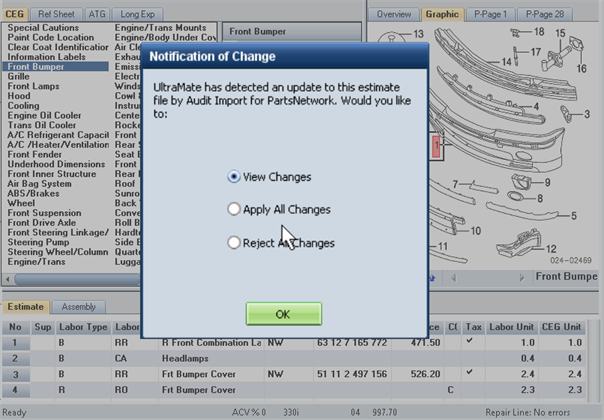
When a change file is found, the Notification of Change dialog box appears.
- On the Notification of Change dialog box, do one of the following:
- To open the change file, click View Changes, and then click OK. Go to step 2.
- To apply all of the changes without reviewing them, click Apply All Changes, and then click OK. (This action also deletes the change file.)
- To reject all changes without reviewing them, click Reject All Changes, and then click OK. (This action also deletes the change file.)
-
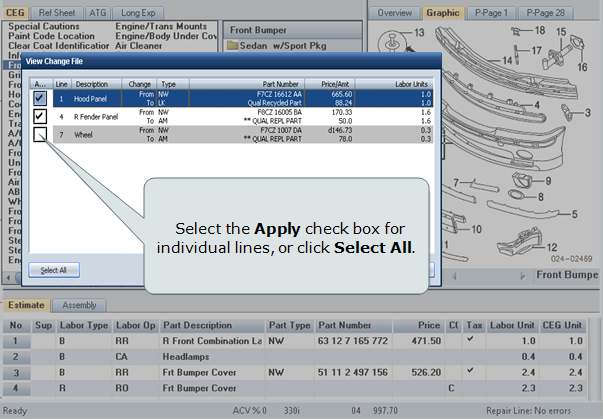
On the View Change File dialog box, review the repair line changes.
-
Select the Apply check box for individual lines, or click Select All to select all of the lines.

- Click Apply Selected.
Reference
Window Components – Notification of Change
|
View Changes |
Select this option to open the change file in the View Change File dialog box. |
|
Apply All Changes |
Select this option to apply all changes to the estimate without reviewing them. After the changes are applied to the estimate, the change file is deleted. |
|
Reject All Changes |
Select this option to reject all changes without reviewing them. A confirmation message appears. Select Yes to delete the changes and the change file. Select No to return to the Notification of Change dialog box. |
Window Components – View Change File
|
Apply |
Select this check box for individual lines you want to apply to the estimate. |
|
Line |
The estimate line number if applicable. |
|
Manual Delete |
When a part search recommends an assembly to replace individual parts in an estimate, this column lists repair lines you may want to delete. |
|
Description |
The part description or labor rate. |
|
Change |
From: Information from the existing estimate. To: The proposed changes. |
|
Type |
The labor or part type. |
|
Part Number |
The part number if applicable. |
|
Price/Amt |
The part price or labor rate. |
|
Labor Units |
The labor time if applicable. |
|
Select All |
Click this button to select all change lines. |
|
Apply Selected |
Click this button to apply selected change lines to the estimate. The button is inactive when no change lines are selected. |
|
Reject All |
Click this button to close the dialog box without applying any of the change lines to the estimate. This action deletes the change file. |
