
Use value-added options to access extra estimating features.
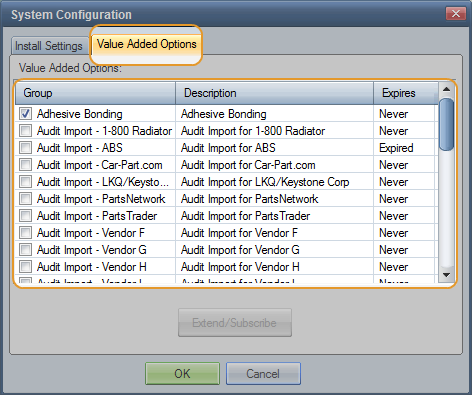
The Value-Added Options tab lists all available options and shows which have been activated and their expiration date. Your installation type determines the options listed.
Some options are subscription-based and require activation and renewal. You can also deactivate and reactivate them yourself as needed.
Other options are available to all users at no additional charge.
To purchase and activate an option, contact your Mitchell representative.
Note: If an option that provides data expires or is deactivated, estimates containing that data are available in Browse mode.
How to
 Activate a value added option
Note: The EMS, Safety Recall Notices, and Adhesive Bonding options are available to all users at no additional cost. To activate, select the check boxes.
- On the Value Added Options tab, select the check box for the option you want to activate. A message appears showing your Workstation ID and prompting you to enter a password.
- To receive your password, call Mitchell Customer Service at (800) 448-4401. Be ready to provide the Workstation ID that appears in the message.
-
In the Enter Password field, type the password you receive, and then click OK.
Note: This password is unique to your Workstation ID and the current date. The password cannot be used on a different machine or on a different date
- If the Activation Instructions prompt appears, click OK to close it.
- Click OK to close the System Configuration dialog box.
- Log off and log back on.
The selected value-added option is now active.
Deactivate a value added option
- On the Value Added Options tab, clear the check box for the option you want to deactivate.
- At the confirmation message, click OK to deactivate the option, or click Cancel to keep the option active.
Extend, reactivate, or resubscribe to a value added option
- On the Value Added Options tab, select the line item of the option you want to extend or reactivate, and then click Extend/Subscribe. This button is active for options that can be reactivated or extended. A message appears showing your Workstation ID and prompting you to enter a password.
- To receive your password, call Mitchell Customer Service at (800) 448-4401. Be ready to provide the Workstation ID that appears in the message.
-
In the Enter Password field, type the password you receive, and then click OK.
Note:This password is unique to your Workstation ID and the current date. The password cannot be used on a different machine or on a different date.
- If the Activation Instructions prompt appears, click OK to close it.
- Click OK to close the System Configuration dialog box.
- Log off and log back on.
The value-added option is now extended or reactivated.
Reference
Value Added Option descriptions
|
This option offers repair techniques other than the traditional welding, body filler, or part replacement. These alternatives may provide more cost effective methods of repair under certain conditions. To purchase and activate the option, contact your Mitchell representative. |
|
|
This option allows you to import changes to estimate lines from authorized vendors or software programs. To purchase and activate the option, contact your Mitchell representative. |
|
|
This option allows you to create estimates for automobiles. The Automobile database offers CEG information for most configurations of passenger cars. It includes a Generic Service you can use to create repair estimates for any make and model. This option is active by default and does not expire. |
|
|
(Estimating Management Standard) |
This option allows you to exchange information between estimating systems and shop management systems. You can exchange administrative data, estimate data, supplement information, part price updates This option is active by default for body shops. |
|
(Mitchell Alternate Parts Program) |
This option allows you to automatically include non-OEM parts (alternate parts) in your estimates. Alternate parts include Alternate New, Remanufactured, and OE Discount parts, as well as Recored, Remanufactured, Rechromed, and alternatives to OEM parts. This option must be activated before it can be used. Contact your Mitchell representative. |
|
This option allows you to create estimates for marine vessels. The Marine database includes a Generic Service you can use to create repair estimates for any make and model. This option must be activated before it can be used. Contact your Mitchell representative. |
|
|
MEDS uses the Mitchell Host as a repository for dispatches and preloads. You can transmit dispatches and preloads to the Mitchell Host, which can then be downloaded by the designated repair shop or adjuster using Mitchell Estimating Communications. If you subscribe to this option, the Mitchell Host automatically activates it the first time you connect. For more information, see Mitchell Dispatching System. |
|
|
This option allows you to create estimates for motorcycles. This option must be activated before it can be used. Contact your Mitchell representative. |
|
|
MultiUser |
This option is automatically available when you purchase a multiuser license for Mitchell Estimating. |
|
(Paintless Dent Repair) |
This option offers a method of calculation and standardized pricing for paintless dent repair estimate lines. This option must be activated before it can be used. Contact your Mitchell representative. Tip: After you activate this option, you can configure and use the PDR Calculator in an estimate. |
|
(Refinish Materials Calculator) |
This options offers a method of calculation and standardized values for refinish (paint) costs. This option must be activated before it can be used. Contact your Mitchell representative. Tip: After you activate this option, you can configure and use RMC in an estimate. |
|
(Recreational Vehicles) |
The option
allows you to create estimates for recreational vehicles (RVs). The RVs service offers
CEG information for This option must be activated before it can be used. Contact your Mitchell representative. |
|
|
This option offers easy access to NHTSA Safety Recall Notice data during the estimating process. This option is active by default. Note: Safety Recall is not available for Generic Services. |
|
This option offers a variety of shop productivity functions. You can convert estimates into repair orders, track parts, and create purchase orders, work orders, parts worksheets, final bills, and reports. This option must be activated before it can be used. Contact your Mitchell representative. |
|
|
This option allows you to set language preference settings to Spanish. Spanish translations apply to part descriptions and field labels. The following parts of the Estimate and Supplement reports are translated: ATG/CEG part descriptions, Labor Type, Labor Operations, Part Type, repair Line headers, non-customizable and default field labels, vehicle options, and the estimate footer. PDF and TIF images are also translated. Note: When a Spanish translation does not exist for a word, phrase, or item, the English term is used. This option must be activated before it can be used. Contact your Mitchell representative. |
|
|
This option allows you to access Mitchell’s database of current and discontinued tires. This option must be activated before it can be used. Contact your Mitchell representative. |
|
|
This option allows you to create an estimate for a passenger truck, SUV, or van. The Trucks database offers CEG information for most truck/SUV/van configurations. It includes a Generic Service you can use to create repair estimates for any make and model. This option is active by default and does not expire. |
|
|
(Medium-duty, heavy-duty) |
This option allows you to create estimates for medium and heavy duty trucks. This option must be activated before it can be used. Contact your Mitchell representative. |
|
WorkCenter Connection |
This option adds an icon to the main window toolbar that starts WorkCenter. If you are not licensed for WorkCenter, the login window appears. |
|
See also: |
