
Use paint tables to automatically calculate paint material costs using lump sum amounts for chunks of refinish time.
You can set up one or multiple paint tables as needed. The paint table selected in the estimate profile is used to calculate paint materials charges for the estimate.
Add, change, or delete paint tables at any time. Changes to paint tables apply to future estimates. Information on existing estimates using the modified paint table does not change. To delete a table that is currently in use by a profile, remove it from the profile.How to
 Add a paint table
- On the System Info menu, click Paint Tables or Hazardous Waste Tables.
- Click New, and on the New Table Name dialog box, enter a unique name, and click OK.
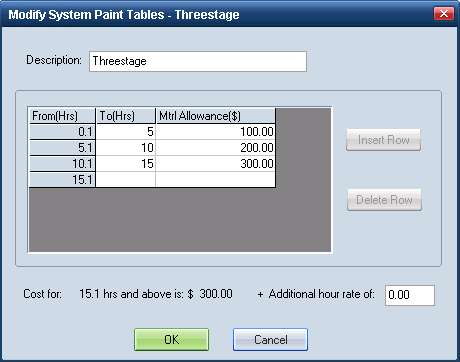
On the System Table dialog box, enter a Description.

- In the To(Hrs) field of the first row, enter the number of hours that marks the end of this first range of time. Let's say you want to charge a lump sum for the first five hours of refinish time (0–5 hours). You would enter 5 in the To(Hrs) field.
- In the Mtrl Allowance($) field of the first row, enter the dollar amount you want to charge per hour for this first range of time.
- To add another row, click Insert Row. The From(Hrs) field in the new row automatically populates with the To(Hrs) from the previous row, incremented by .1 hour. In our example, the From(Hrs) for the new row would be 5.1.
- In the To(Hrs) field for the new row, enter the number of hours that marks the end of this next range of time.
- In the Mtrl Allowance($) field, enter the dollar amount you want to charge for this next range of time.
- Repeat this process to create as many rows as you need.
- Click OK to save the table.
 Use a paint table in an estimate
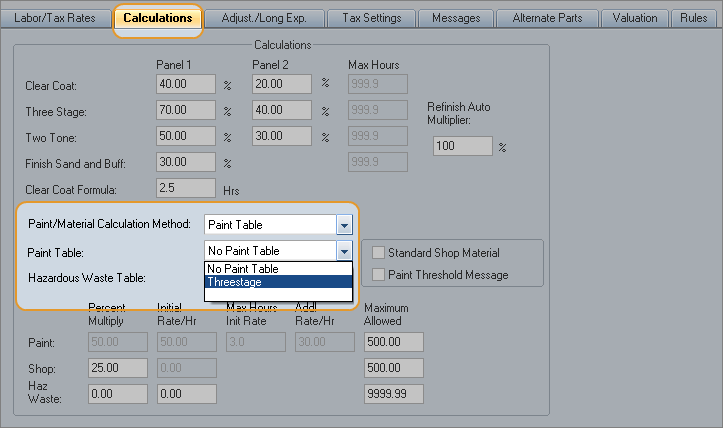
Choose the paint table in the Calculations profile tab.
- Use that profile in estimates where you want to use those paint rates.
Reference
Window Components – Paint TablesDescription | A description of the table. |
From(Hrs)/To(Hrs) | The range of hours you want to charge at a particular rate per hour. |
Mtrl Allowance($) | The amount you want to charge for the range of hours specified in the row. |
Cost for | Shows the maximum number of hours listed in the table. Use with +Additional hour rate of. |
Additional hour rate of | The amount to be charged per hour above the maximum number of hours shown in the Cost for area. |
Insert Row | Inserts a table row above the selected row. (If a row is not selected, the new row is inserted above the first row.) |
Delete Row | Deletes a table row. The From hours of the following row are adjusted to include the hours for the deleted row. |
See also: |
