
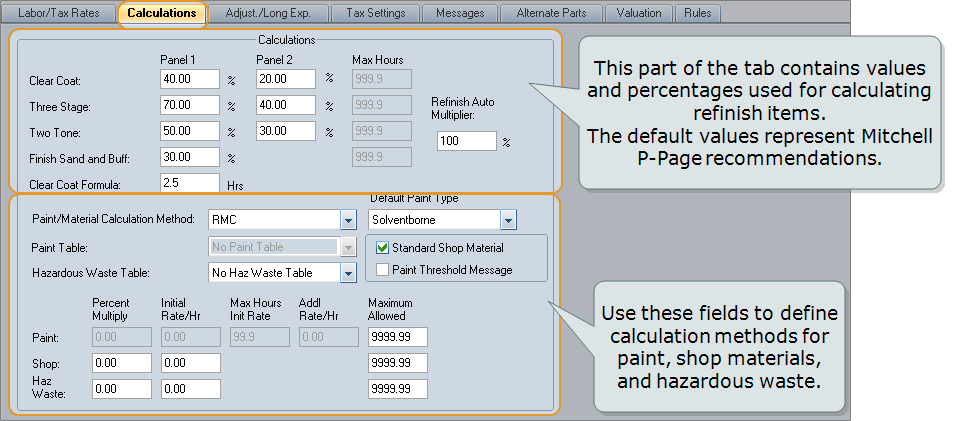
Use the Calculations tab in the profile to set up automatic calculations for paint materials, shop materials, and hazardous waste.
Reference
 Window Components – Calculations profile tab
|
The percentage of refinish labor hours added for clear coat, for panels 1 and 2. When an appropriate refinish line is detected, the clear coat line is automatically added to the bottom of the repair lines. |
|
|
The percentage of the refinish labor hours to be added for three-stage, for panels 1 and 2. |
|
|
The percentage of the refinish labor hours to be added for two-tone, for panels 1 and 2. Two tone is calculated as follows: (The first panel × the % value set for Panel 1) + (subsequent panels × the % value set for Panel 2). The panels, ordered from front to back, are defined as refinish lines having either "B – Both" or "T – Two Tone" in the CC/TT column. |
|
|
The percentage of the refinish labor hours to be added for finish, sand, and buff. |
|
|
The number of hours for clear coat refinish calculation. Undersides of hoods and jambs do not use this formula. |
|
|
The percentage value used to calculate each type of refinish labor for panel 1. |
|
|
The percentage value used to calculate each type of refinish labor for additional panels. |
|
|
The maximum number of hours allowed for each refinish labor type. For new estimates and existing estimates that do not have a Max Hours setting, the default value is 999.9. You cannot change this value. For existing estimates that have a maximum hours setting, you may change the maximum hours by entering a new maximum, or remove it by entering 999.9. |
|
|
The percentage value applied to the full CEG refinish time when partial refinish (the Ref% button) is applied in the Repair/Other dialog box. The default value is 100%. The value can be set between zero and 999%. This value appears in the Profile report. |
|
|
The method used to calculate paint materials: Rates (the default), Paint Table, Percent Multiplier, and RMC (Refinish Materials Calculator). The selected method appears on the estimate report under the Additional Costs section. Note: The RMC method is available when the RMC value-added option is active. |
|
|
This field is visible when the selected Paint/Material Calculation method is RMC. Your selection here becomes the default Paint Type in RMC (Refinish Materials Calculator). The default is Solventborne. |
|
|
To use a predefined paint table to calculate paint materials charges, select Paint Table from the Paint/Material Calculation list, then select the table from this list. |
|
|
To use a predefined hazardous waste table to calculate hazardous waste charges, select the table from the list. |
|
|
Select this check box to limit the shop materials calculation to CEG repair lines and repair lines with a labor operation of Repair. Clear this check box to include all repair lines (except refinish repair lines) in the shop materials calculation. |
|
|
This check box works with the Paint Limit option for calculating paint materials costs. When you select this check box, a generic message prints on your estimate repair lines when the paint materials exceed the cap. |
|
|
The calculation settings for paint materials. Note: This field is active when the Percent Multiplier is selected on the Paint/Material Calculation list. |
|
|
Shop |
The calculation settings for shop materials. |
|
The calculation settings for hazardous waste. |
|
|
The percentage value that is used to calculate the dollar amount for materials. See paint materials and hazardous waste. Note: This item appears on the estimate report (under the Additional Costs section) when Percent Multiplier is the selected Paint/Material Calculation method. |
|
|
The hourly rate used to calculate the materials value for hours up to the Max Hours. |
|
|
The maximum number of hours to be charged at the rate entered in the Initial Rate/Hr field. After this number of hours, the rate in the Addl Rate/Hr field is used in the calculation. |
|
|
The hourly rate used to calculate the materials charge for the number of hours over the Max Hours. |
|
|
The maximum dollar amount to be charged for each type of material. If the calculated amount is more than this, only this amount is charged. |
|
|
* These items appear on the estimate report (under the Additional Costs section) when Rates is the selected Paint/Material Calculation method. |
|
|
See also: |
