
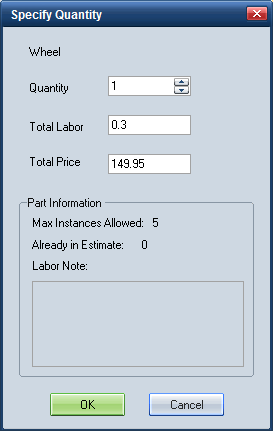
Use the Specify Quantity dialog box to specify the number of parts you want to include on a repair line.
When you add a repair line, the default part quantity for most parts is one. Some parts, however, allow multiple instances of the part to be added to the estimate (for example, tires). For these parts, you can specify multiple part quantities on one repair line instead of having to add the repair line multiple times.
You can also modify the part quantity on existing repair lines for parts that allow multiple instances.
Note: This functionality applies only to repair lines with a Remove/Replace (R&R) labor operation.
Note: The Specify Quantity dialog box displays by default when you select a part that allows multiple instances. If it does not display, select the Show Quantity Dialog by Default check box on the Miscellaneous tab of the Preferences dialog box.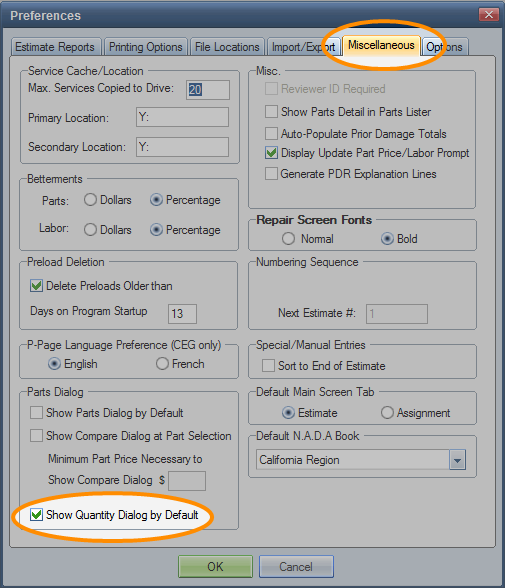
How to
 Specify part quantity when adding a line
-
On the CEG part list, select the part you want to add. If multiple instances of the part are allowed, the Specify Quantity dialog box appears.

Note: If multiple instances are not allowed for the part, the Specify Quantity does not appear.
-
In the Quantity field, enter the number of parts you want to include on the repair line.
Note: The Total Labor and Total Price values reflect a default part quantity of 1. The values update automatically as you enter a quantity.
-
If needed, modify the Total Labor, Total Price, or both.
Note: Modified values display an asterisk (*) on the repair line to show they were modified from the system value.
- Click OK.
 Modify part quantity on an existing line
-
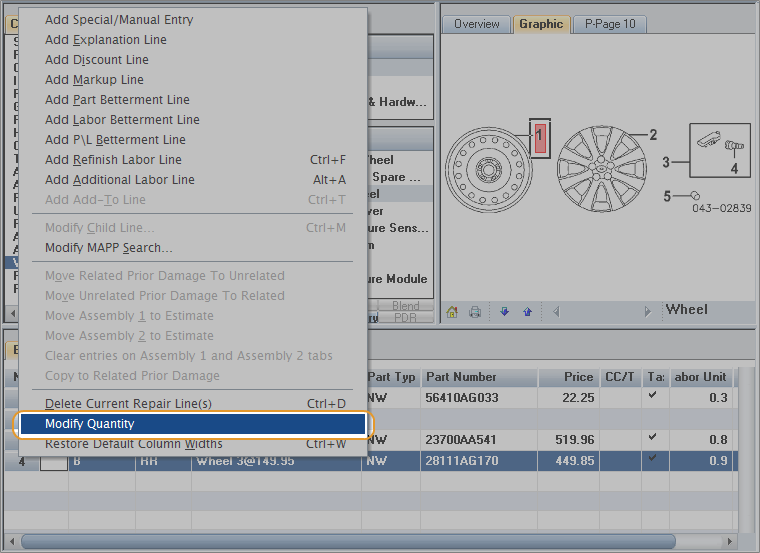
Right-click the repair line, and click Modify Quantity.

Note: If multiple instances are not allowed for the part, the Modify Quantity command is not available.
-
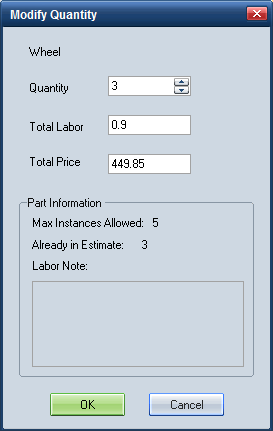
On the Modify Quantity dialog box, in the Quantity field, enter the number of parts you want to include on the repair line.

-
If needed, modify the Total Labor and/or Total Price values.
Note: An asterisk (*) displays on the repair line to indicate the CEG value was modified.
- Click OK.
Reference
|
Quantity |
Enter a number or use the field arrows to indicate the number of parts you want to include on the repair line. The default value is 1. (Whole values only.) |
|
Total Labor |
Displays the total CEG labor units for the part quantity entered. The default value reflects a part quantity of 1. |
|
Total Price |
Displays the total CEG price for the part quantity entered. The default value reflects a part quantity of 1. |
|
Note: When a CEG value is modified, an asterisk (*) displays on the repair line to indicate a change to system information. |
|
|
Part Information |
These fields are read-only. |
|
Maximum Instances Allowed |
Displays the maximum part quantity allowed. |
|
Already in Estimate |
The part quantity already in the estimate. |
|
Labor Note |
Any labor notes from the CEG database for the part. |
|
See also: |
