
Itemized Totals Report
Use the Itemized Totals report to append cost detail information to the Estimate report. It lists subtotals and cost details for labor, parts, adjustments, and additional repair-related, non-part/labor costs. The Itemized report does not replace the Totals section of the Estimate report, and it does not include administrative information.
How to
 Print the Itemized Totals report
- Open the estimate.
-
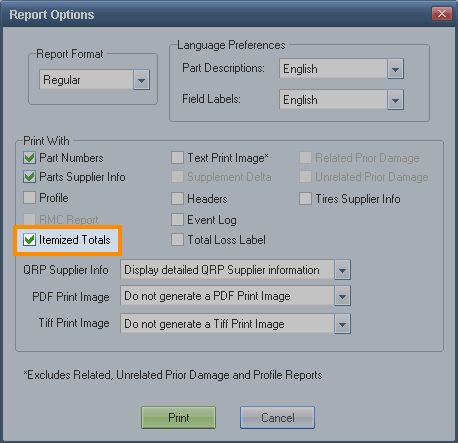
On the File menu, point to Print, and click Estimate. The Report Options dialog box appears.

- Select the Itemized Totals check box, and then click Print. The Print dialog box appears.
- Click OK. The Estimate report with itemized estimate totals prints to your default printer.
Reference
Window Components – Itemized Totals report
|
Section I: Labor Subtotals |
Labor Type (Body, Refinish, Frame, etc.) and corresponding Labor Operation (Remove/Replace, Repair, Overhaul, etc.) |
|
Section II: Part Replacement Summary |
Part types, markups, and discounts for Taxable Parts, Part Adjustments, and Glass Adjustments. |
|
Section III: Additional Costs |
Costs that are part of the repair but are not a part, for example: towing, storage, broken glass cleanup, coolant, and the like. |
|
Section IV: Adjustments |
Parts, Labor, and P/L Betterment as well as Appearance Allowance. |
Tip: You can find this information in the open estimate by viewing the Estimate Totals dialog box.
Note for Canadian users: The Itemized Totals report replaces the Tax Itemizations report. It includes Canadian tax itemizations for GST or HST tax (based on your preference settings) and Sales Tax within the itemized subsections described above.
|
See also: |
