
You can retrieve an estimate to add a supplement, print a supplement delta report, or audit the estimate. You can retrieve an estimate without locking it so other users can continue to work in the estimate if needed.
Note: When you retrieve an estimate for supplementation in a multiuser environment, you are notified if the estimate is already checked out and by whom. You can continue or cancel the estimate retrieval. If you do retrieve the estimate, the version of the estimate first returned to the Mitchell host (yours or the estimator who has the estimate already checked out) is saved.
How to
 Retrieve an estimate or supplement
- On the Utilities menu, point to Host Communications, and click Initiate Host Transaction.
-
Double-click Retrieve Estimates.
-
On the Estimate Request dialog box, in the Estimate ID field, enter the number of the estimate you want to retrieve.

- Do one of the following:
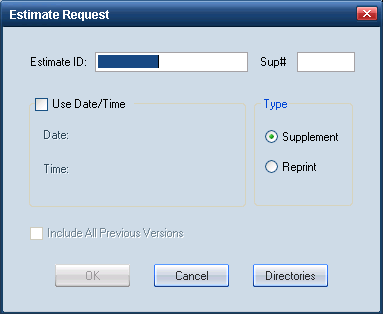
- To retrieve the latest supplement, leave the Sup # field blank.
- To retrieve all previous versions of the estimate, enter a Sup #, and select the Include All Previous Versions check box.
Tip: You need to retrieve all previous versions of an estimate to run a Supplement Delta Report.
- Do one of the following:
- To retrieve a specific supplement, select the Use Date/Time check box, and enter the corresponding date and time.
- To retrieve the original estimate, clear the Use Date/Time check box.
- To create a supplement, select the original estimate or latest supplement, and select the Supplement option.
- To reprint the downloaded estimates, click the Reprint option.
- Click OK to save the settings and return to the Host Communications dialog box. The selected estimates appear in the panel to the right.
- Click Call Host.
|
See also: |
