
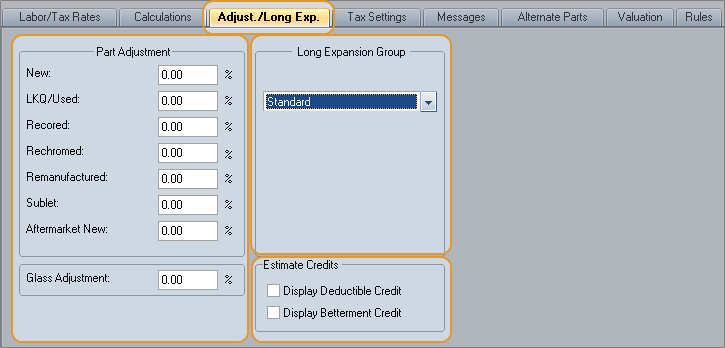
Use the Part Adjustment area of the Adjust/Long Exp tab to define markup and discount percentages for parts and glass.
Tip: Discounts are entered with a minus sign (-) in front. For example, a 5% discount is entered as -5.00.
Use the Long Expansion Group area of the Adjust/Long Exp tab to change the list of long expansion items that will be available to the estimator when using the profile.
You can also enable estimate credits (deductible and betterment).
How to
 Enable and apply Deductible/Betterment Credit
- Open the profile that you want to use deductible/betterment credits, and click the Adj./Long Exp tab.
- In the Estimate Credits area, select the Display Deductible Credit and/or Display Betterment Credit check boxes depending on the credits you want to apply to estimates.
- Create an estimate using this profile.
-
- To apply betterment credit, select the Betterment Credit check box. All betterment items in the estimate are credited back to the insured. The Betterment Credit Disclaimer automatically prints on the estimate reports.
-
To apply deductible credit, click the Edit button, and enter the Deductible Amount. In the Deductible Status list, select Not Waived, and enter the Deductible Credit. This amount is credited back to the insured. The Deductible Credit Disclaimer automatically prints on the estimate reports.
Note: You can change the default disclaimer text on the Messages profile tab.
Reference
Markup Formulas
In retail, cost plus is considered a true markup. In the collision estimating industry, both cost plus and straight markup are acceptable markup methods. Allowable entries are -99.99 to +99.99. Use a negative sign (-) to indicate a discount.
|
Formula |
cost / (1 - markup) |
|
Example |
100 / (1 - .15) = $117.65 |
|
Formula |
cost x (1 + markup) |
|
Example |
100 x (1 + .15) = $115.00 |
Deductible/Betterment Credit
Use the Estimate Credits settings to credit back to the insured some or all of the insured's deductible and/or all betterment items in the estimate.
Deductible and betterment credits are subtracted from the amount the customer owes (called Customer Responsibility) and are applied when the estimate is calculated.Estimate credits are included as part of the Customer Responsibility total in the Estimate and Itemized Totals reports. They also appear in the Global Changes section of the Supplement Delta report. Any predefined disclaimers about the credits automatically print on the estimate reports when one or both has been applied to the estimate.
Window Components – Adjust./Long Exp tab
|
New |
The discount or markup percentage to be applied to New parts. |
|
LKQ/Used |
The discount or markup percentage to be applied to LKQ/Used parts. |
|
Recored |
The discount or markup percentage to be applied to Recored parts. |
|
Rechromed |
The discount or markup percentage to be applied to Rechromed parts. |
|
Remanufactured |
The discount or markup percentage to be applied to Remanufactured parts. |
|
Sublet |
The discount or markup percentage to be applied to all Sublet parts and glass (including windshields and back window glass). Applies to all estimates, regardless of prior calculation method. |
|
Aftermarket New |
The discount or markup percentage to be applied to Aftermarket New parts. Note:Apply discounts or markups for OE Discount Parts on the repair lines. |
|
Glass Adjustment |
The discount or markup percentage to be applied to New Glass. Glass adjustments apply only to new windshield and back window glass. If the Part Type for the glass part is changed to Sublet, the Sublet adjustment applies, even to windshield and back window glass. |
|
Use Cost-Plus Markups |
The “cost-plus” method subtracts a percentage of the marked up amount to arrive at the original price. The “regular” method adds a percentage of the original price to arrive at the marked up price. Here's an example using a 10% markup: Cost-Plus: marked up price ($111) - markup (10%=$11) = part price ($100) Regular: part price ($100) + markup (10%=$10) = marked up price ($110) |
|
Long Expansion Group |
The Long Expansion Group associated with the Profile. Mitchell Estimating comes with a default group of long expansion lists called Standard. See Setting Up Long Expansions and Using Long Expansions. |
|
Estimate Credits |
Display Deductible Credit Select this check box to display the Deductible Credit
field on the Display Betterment Credit Select this check box to display the Betterment Credit
check box |
|
See also: |
