
Use Long Expansion lists to add Reference Sheet items that are not included in repair operations. These items could include towing, storage, broken glass cleanup, and so on. You can also use long expansion lists to reinforce what you want to charge for specific items, such as coolant or wheel alignments.
Mitchell Estimating includes a customizable database called Long Expansions. The Standard long expansion list is loaded during product installation. You can use long expansions to define estimate items specific to your business.
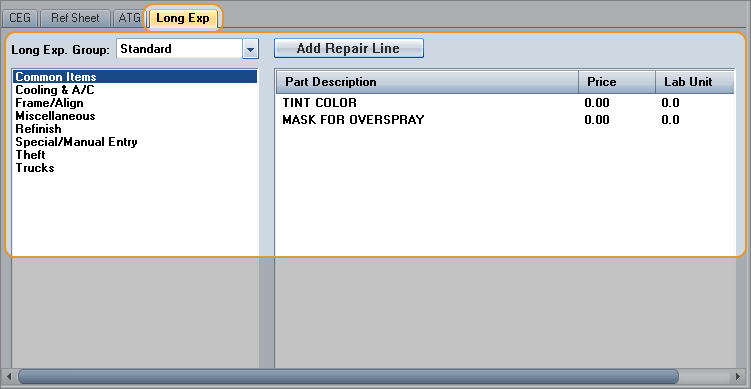
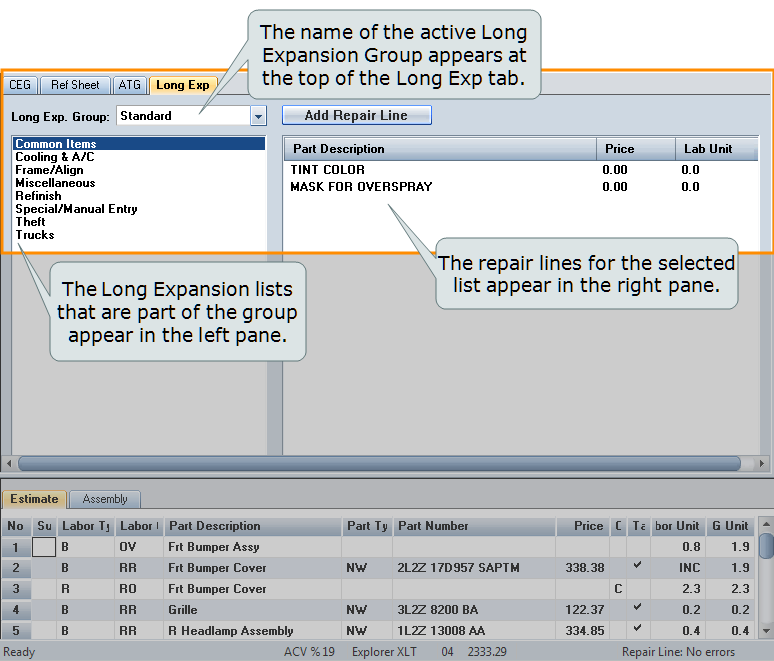
In an estimate, the name of the active Long Expansion Group appears at the top of the Long Exp tab. The Long Expansion lists that are part of the group appear in the left pane. The repair lines for the selected list appear in the right pane. The following image shows that the Standard long expansion group is active, the Common Items long expansion list in that group is selected, and the Common Items list contains repair lines for Tint Color and Mask For Overspray.
The default Long Expansion Group is set in the Profile. You can change the long expansion group from this default while you're in an open estimate. The change applies just to that estimate and won't affect the source profile.
Once a long expansion repair line is added to an estimate, you can edit it like any other estimate repair line.
You can also add repair lines from the estimate to the long expansion list, but you cannot delete a line from the long expansion in the estimate. See Setting Up Long Expansions for more information about modifying long expansion groups.
How to
 Display Long Expansions
-
- In the repair lines, select the Ref Sheet repair line you want to add. (Only one item at a time can be added, and the selected repair line must be a Reference Sheet item and cannot be a child line.)
- Click Add Repair Line, and click OK to confirm. The estimate repair line item is added to the long expansion list and appears under Part Description.
Note: If the added repair line is a Special/Manual Entry line, its part description appears in blue text.
Add a long expansion list to your estimate
On the Long Exp tab, do one of the following:
- To add all items in the list, double-click the long expansion list name, and click OK at the message to add all items.
- To add individual items in the list, single-click the long expansion list name to display the items in the Part Description section. Then, double-click the items you want to add.
Add repair lines from your estimate to a long expansion list
- On the Long Exp tab, highlight the long expansion list you want to add a repair line to. Repair lines that are already in the list appear under Part Description.
- In the estimate repair lines, select the repair line you want to add. (Only one item at a time can be added, and the selected repair line must be a Reference Sheet item and cannot be a child line.)
- Click Add Repair Line, and click OK to confirm. The estimate repair line item is added to the long expansion list and appears under Part Description.
Switch to another Long Expansion Group within an estimate
- On the Long Exp tab, click the Long Expansion Group arrow, and then click the long expansion group you want to switch to. The new group, its categories and line entries, replace those of the previously selected long expansion group.
- Use this new long expansion group in the estimate.
- Add repair lines to the group,
- Add the group to the repair lines, and so on.
Changes made to the long expansion group here synchronize with the long expansion group on the profile. You can review the changes on the Long Expansion Activity Log.
|
See also: |
