
Use the labor operation buttons to quickly add repair lines for these labor operations: Repair, R&I (Remove/Install), Blend, Manual Refinish, and Manual Entry.
You can use multiple labor operation buttons (as they apply) on a single part.
The buttons are available on the following part lists as they apply to a selected part:
- CEG: All of the labor operation buttons are available.
- Ref Sheet: Only the Manual Entry button is available.
- ATG: The Manual Refinish and Manual Entry buttons are available.
- Long Exp: No labor operations buttons are available.
Note: See the Reference section in this topic for more information about how and when you can use these buttons.
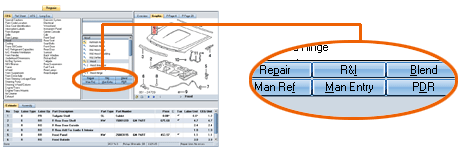
Reference
 Window Components – Labor Operation button descriptions
|
Repair |
If the selected part has a default labor operation of RR (Remove/Replace), use this button to add the part as a repair line with an RP (Repair) labor operation instead. |
|
R&I |
Remove/Install If the selected part has a default labor operation of RR (Remove/Replace), use this button to add the part as a repair line with an RI (Remove/Install) labor operation instead. |
|
Blend |
If the selected part has a refinish headnote, use this button to add the headnote as a blend item. When the repair line is added, the cursor defaults to the Labor Unit field, allowing you to enter a modified labor time for the blend operation. |
|
Manual Refinish |
This button is available if the selected part (not the headnote) is already in the estimate as a parent repair line and is eligible for manual refinish. In this case, you can add a refinish child line by clicking the Manual Refinish button (versus clicking the Add Refinish Labor Line command on the Edit menu). If an automatic RO line is already attached to the repair line, the Manual Refinish line overrides it. |
|
PDR |
Use this button to display the PDR Calculator which allows you calculate the cost of a paintless repair procedure based on information you enter about dent size, location, and quantity for the selected part. This button is available when:
|
|
Manual Entry |
Use this button to add a special/manual entry repair line from either the CEG, ATG, or Reference Sheet tab. |
|
See also: |
