
The Estimate report prints the current estimate and can include the estimate profile, vehicle owner, and part supplier information.
You can also generate an estimate (.est) file and print a Supplement Delta report.
If you added Related and/or Unrelated prior damage repair lines to the estimate, you can include this information in the Estimate report or print separate prior damage reports as needed. The Related Prior Damage and Unrelated Prior Damage reports are similar to the Estimate report in form and content.
Note: For Canadian users, the Estimate report includes the amounts for GST or HST tax (based on your print option preferences ) in each section where they apply.
How to
 Select a company name to print on the Estimate report
- Open the estimate you want to print.
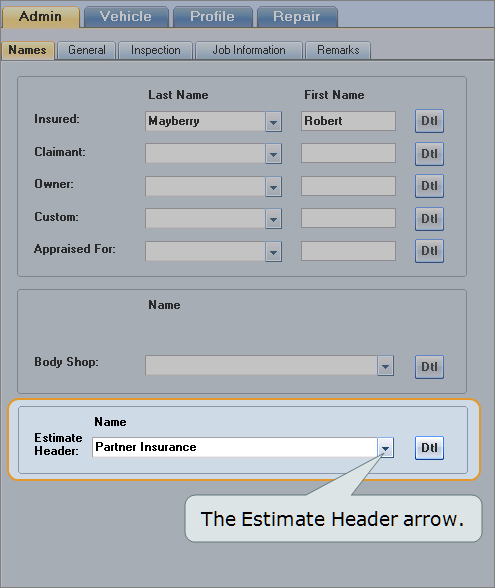
- Click the Admin tab, and then click the General subtab.
-
Click the Estimate Header arrow, and select the company name you want to print on the report, or select the empty record to leave the heading blank.

Note: If a name you want to use isn't in the list, you can enter the information here, but it will apply to this estimate only. Use the Company dialog box to add it to the Name & Address list.
 Print preview and print the Estimate report
- Open the estimate you want to print.
- Calculate the estimate
 .
. - On the toolbar, click the Print arrow
 , and then click Estimate.
 -
On the Report Options dialog box, select the options you want to print on the report. (For descriptions of these options, see Window Components – Report Options later in this topic.)

- To preview the report, click Print Preview.
- To print the report to your default printer, on the preview window, click Print
 .
.


 Print a PDF of the estimate
- Open the estimate you want to print.
- Calculate the estimate .
- On the toolbar, click the Print arrow, and then click Estimate.
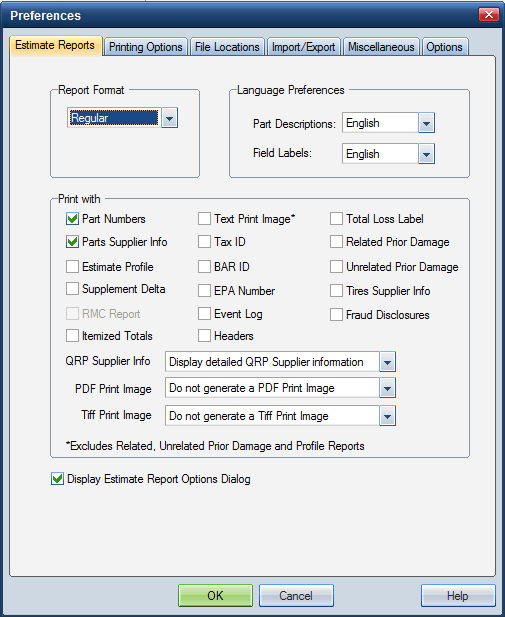
- On the Report Options dialog box, in the PDF Print Image list, click Generate a single file PDF Print Image.
- Click Print.
-
On the Print dialog box, click the Name arrow, and click UltramatePDFDriver, and then click OK.
The estimate is saved to the \mitchell\aces\image directory as a .pdf file.
Reference
Window Components – Estimate report
Note: These descriptions also apply to the Unrelated Prior Damage report. Some of the fields refer to specific items, while others refer to columns in tables. Some of the fields appear in a report only if they are applicable.
|
Date |
The system date and time when the report was printed. |
|
Estimate ID |
The file number, claim number, or system-generated number used as the estimate ID. The type of estimate ID is determined at installation. |
|
Type of Prior Damage |
If this is a prior damage report, the type of prior damage is indicated here. |
|
Estimate Version |
The version number for the estimate. When the estimate is created and committed for the first time, this field is set to 0. The number automatically increments by 1 each time the estimate is committed again as a correction and/or supplement. |
|
Correction or Supplement |
If this report is for a correction or supplement, the correction or supplement number prints here. |
|
Status |
The status of the report. Committed: The estimate has been committed. Preliminary: The estimate has not been committed. |
|
Profile ID |
The profile on which the estimate is based. If the profile was modified, an asterisk appears next to the name to indicate that it was customized for this estimate. |
|
Company Information |
The company name, address, and phone number |
|
Damage Assessed By |
The last name of the user who entered the estimate. |
|
Admin Data |
Information entered on the |
|
Owner information |
Owner information entered on the
|
|
Mitchell Service Code |
The Service Code relates the vehicle to the Mitchell Collision Estimating Database (CEG) and defines the labor and parts for vehicle repair. |
|
Vehicle Data |
Information from the |
|
Options |
The optional equipment selected in the |
|
Repair Line Data |
Information from the |
|
Line Item |
The repair line number. These are sequential and used for reference. Any related prior damage repair lines are displayed in their own section. Unrelated prior damage repair lines are not included in the Estimate Report but can be printed in a separate report. |
|
Entry Number |
The Mitchell tracking number of the repair line. System-generated lines (auto-includes) display "AUTO" in this column. |
|
Labor Type |
The type of labor (F-Frame, B-Body, G-Glass, and so on). |
|
Operation |
The labor operation (RR-Remove/Replace, RI-Remove/Re-Install, RO-Refinish Only, RP-Repair, and so on). |
|
Line Item Description |
The description of the repair line entered by the system. |
|
Part Type/Part Number |
The part type (such as Like Kind & Qual - Used Part) or the part number, if applicable. |
|
Dollar Amount |
The price of the part or dollar amount of the labor to be charged. INC: Indicates that the price for the item is included in another repair line. |
|
Labor Units |
The number of labor hours required for the line item. INC: Indicates that the amount is included in another repair line. |
|
Special Indicators |
* Indicates that the system-generated value was modified. entry is based on the estimator's judgment rather than the CEG data. # Indicates that a labor note applies to the line item. Labor notes provide information that clarifies which operations are included (or not included) in the CEG line item. d Indicates that the manufacturer discontinued the part. ** Indicates that this is a QRP part. (QUAL REPL PART: Quality Replacement Parts) C Indicates that the labor hours are included in the amount listed for clear coat and/or two tone. r Indicates that an R&R labor unit is used on an R&I repair line. This indicator appears when the labor operation was changed from R&R to R&I but an R&I labor unit wasn't available. |
|
Aftermarket Parts Disclaimer |
A disclaimer regarding any aftermarket parts used in the estimate. |
|
Recycler Information |
Information on the quality recycled parts in the estimate and the QRP suppliers who provide them. |
|
Remarks |
The text entered on the Remarks page of the Administrative Information section of the estimate. |
|
Labor Subtotals |
The hours, rates, and totals for each category of labor on the estimate. The rates come from the Profile - Labor/Tax Rates window. |
|
Part Replacement Summary |
The total amount charged for parts, including tax (if applicable). |
|
Additional Costs |
The total of any additional costs entered on the estimate. (The amount includes tax.) |
|
Adjustments |
The totals of any adjustments, such as betterment or a deductible amount. |
|
Totals |
The totals for each section and the final estimate total. The total for any related prior damage appears under Adjustments with details shown in a separate Prior Damage Totals section. An asterisk (*) indicates that the customer responsibility amount for the related prior damage was changed by the estimator. |
|
Prior Damage |
Prior damage statements or notes if entered. |
|
Points of Impact |
Primary or secondary or both. (P) indicates primary. (S) indicates secondary. |
|
Cycle Time Information |
Milestone dates and times related to the repair, vehicle drivable condition, and rental assistance information. |
|
Estimate Recall Number |
The date and time the estimate was committed and the estimate ID. If the report is for a supplement, this information is for the original estimate. |
|
Mitchell Data Version |
The version of the database. |
|
Copyright Information |
The copyright date of the report. |
|
Page Number |
The page number and total number of pages for the report. |
|
See also: |
