
Use the Alternate Parts profile tab to activate the Alternate Part Search feature in the profile.
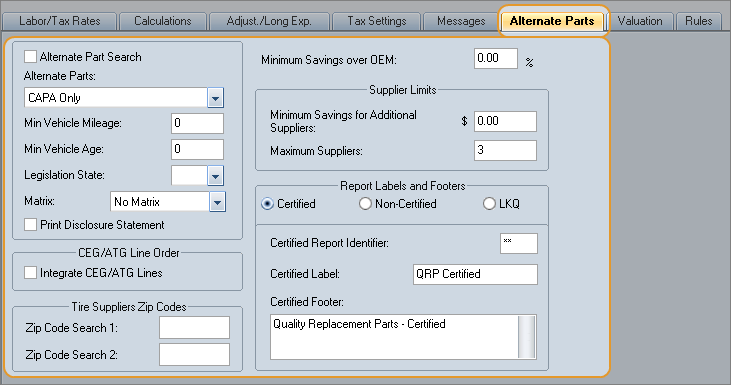
Alternate Part Search uses the Mitchell Alternate Parts Program (MAPP) to search for alternate parts to replace OEM parts in your estimates.
MAPP automatically searches for alternate parts during the estimating process. When MAPP finds a qualified alternate part, the system uses it in the estimate instead of the OEM part.
Note: Alternate parts include Alternate New, Remanufactured, and OE Discount parts, as well as Recored, Remanufactured, Rechromed, and alternatives to OEM parts.
Mitchell Parts Portal
Another Alternate Part Search method is being introduced to customers who choose to adopt the tool. Mitchell Parts Portal is a web-based estimating tool that provides users with quick access to alternate parts data while they are writing estimates. Users are able to make all of their parts and supplier selections in one location. This is achieved through the Online Parts Profile in Mitchell Estimating. For more information, refer to Online Parts Profiles.
How to
 Set up alternate part search in a profile
Note: To set up alternate part search in a profile, first subscribe to and activate MAPP and download your MAPP matrices.
- Open the system profile that will use MAPP search, and click the Alternate Parts tab.
- Select the Alternate Part Search check box.
- In the Alternate Parts list, click the category of alternate part you want to use.
- Select an alternate part Matrix.
- Use this profile when you want to include alternate parts in your estimates.
Tip: You can make the same changes in an open estimate's profile.
See these topics for more info: Profiles and Online Parts Profiles.
Reference
Window Components – Alternate Parts tab
|
Select this check box to automatically search for alternate parts when the estimate using this profile is calculated. Clear the check box to avoid searching for alternate parts when using this profile. (You can override this setting for a particular repair line or estimate.) |
|
|
Select the alternate parts search criteria.
|
|
|
You can limit MAPP searches to vehicles with mileage higher than the minimum amount you enter here. |
|
|
You can limit MAPP searches to vehicles that are older (in years) than the minimum age you enter here. |
|
|
Legislation State |
Select the state in which the vehicle is being repaired. This setting determines which state disclosure statement is printed on estimates that include alternate parts. |
|
Select the matrix (the list of alternate parts suppliers) to be used for the alternate parts search. Matrices are downloaded from the Mitchell host. If this field is blank or the name cannot be found in the matrix file, the calculation and data are based on OEM part prices. |
|
|
Select this check box to print the state disclosure statement on estimates that include alternate parts. The Legislation State field determines the statement that is printed. You can choose not to print the disclosure statement and instead enter a custom disclosure statement using the fields on the the Messages profile tab. |
|
|
|
|
|
Select this check box to group together CEG and ATG (new and used) part lines for the same section of the vehicle. Clear the check box to separate CEG and ATG part lines. This settings does not affect repair line sort order. Repair lines still sort front-to-back, outside-to-inside regardless of line integration. You can change this setting at the estimate profile but not after the estimate is committed. Print images and estimate reports display the sort order you select. Note: Mitchell Estimating calculates estimates as if CEG and ATG lines are integrated, regardless of this setting. |
|
|
Tire Suppliers Zip Codes Note: This section is available only if the Tires Database value-added option is active. |
|
|
Zip Code Search 1 |
If you subscribe to the Tires Database, enter the ZIP code to use in searching the tire supplier database. The search includes suppliers within a reasonable distance of the ZIP code entered. |
|
Zip Code Search 2 |
Enter a second ZIP code to use in searching the tire supplier database. |
|
Note: Alphanumeric characters are accepted. The search includes suppliers within the region of the ZIP codes entered. If no ZIP code is entered, the system defaults to searching all ZIP codes. |
|
|
Minimum Savings over OEM |
In order for Mitchell Estimating to select an alternate part, the savings over the CEG part must be at least this percentage. Enter the percent as a positive number with two places, such as 15.25. |
|
Minimum Savings for Additional Suppliers |
The dollar amount that must be saved in order for another supplier to be added to the estimate. This savings becomes inapplicable if the Maximum Suppliers number has been reached. |
|
Maximum Suppliers |
The maximum number of alternate parts suppliers that can be used for one estimate, up to nine suppliers. If the number of suppliers exceeds this number, a new supplier isn't added to the estimate, regardless of the amount that can be saved. |
|
Report Labels and Footers |
|
|
The Report Labels and Footers section controls the labels that are used to identify alternate parts on the estimate. Mitchell recommends that these labels only be changed with the assistance of a Mitchell representative. |
|
|
|
|
|
|
|
|
See also: |
|
| Online Parts Profiles |
